

UX strategy framework: data-driven design decision making
Most UX strategies sit in a slide deck and never touch real design decisions. Here's a framework that connects your vision, goals, and plan to live product data, so every design call has evidence behind it.


UX strategy framework: data-driven design decision making
You've probably sat through a strategy offsite where someone wrote "delightful experiences" on a whiteboard and everyone nodded. Three months later, the same team is shipping screens that feel disconnected, and the strategy doc is buried in a Notion graveyard.
That's not a strategy problem. It's a translation problem. Most UX strategies fail because they live as words in a deck while design decisions get made in real time, often without the data to back them up. Designers ship what feels right. Product managers ship what the loudest voice asks for. Nobody ties either back to what users are actually doing.
A real UX strategy framework does one thing well: it gives every person making a design decision a clear way to check it against the strategy and the evidence. This guide walks through how to build that framework, starting from your vision and ending with the data feedback loops that keep the strategy alive.
What a UX strategy framework actually is
A UX strategy framework is a structured plan that connects your product's vision to the day-to-day design choices your team makes. It's not a wish list, and it's not a brand book. It's the bridge between "where we want our product experience to be in 18 months" and "should we redesign this empty state next sprint."
The Nielsen Norman Group describes a UX strategy as "a plan of actions designed to reach an improved future state" of the user experience over time. They break it into three components: a vision, goals, and a plan. That's the skeleton. The framework is what fills it with evidence and accountability.
You can read the full definition in their article on UX strategy components, which covers the three building blocks in detail. What that article doesn't cover, and what most teams miss, is how to keep the strategy connected to real product data once you start shipping.
Why most UX strategies fall apart
The collapse usually happens for one of three reasons.
The strategy is too abstract to test. "Improve the onboarding experience" sounds like a goal, but you can't tell if you've achieved it. Two designers will interpret it differently and ship two different things.
There's no shared evidence layer. Designers reference user interviews from six months ago. Product managers point to Mixpanel funnels. Engineering looks at Sentry logs. Everyone has data, but nobody has the same data, and the strategy doesn't say which one to trust.
Decisions happen too far from the strategy. By the time a designer is working on a specific screen, the strategy is buried in a doc nobody opens. The link between "our vision is to reduce friction in collaboration" and "what should this share button look like" is broken.
A good framework fixes all three. It gives you goals you can actually measure, a single place to look at evidence, and a way to bring strategy into every design review without having to re-read a 30-page doc.
The four layers of a UX strategy framework
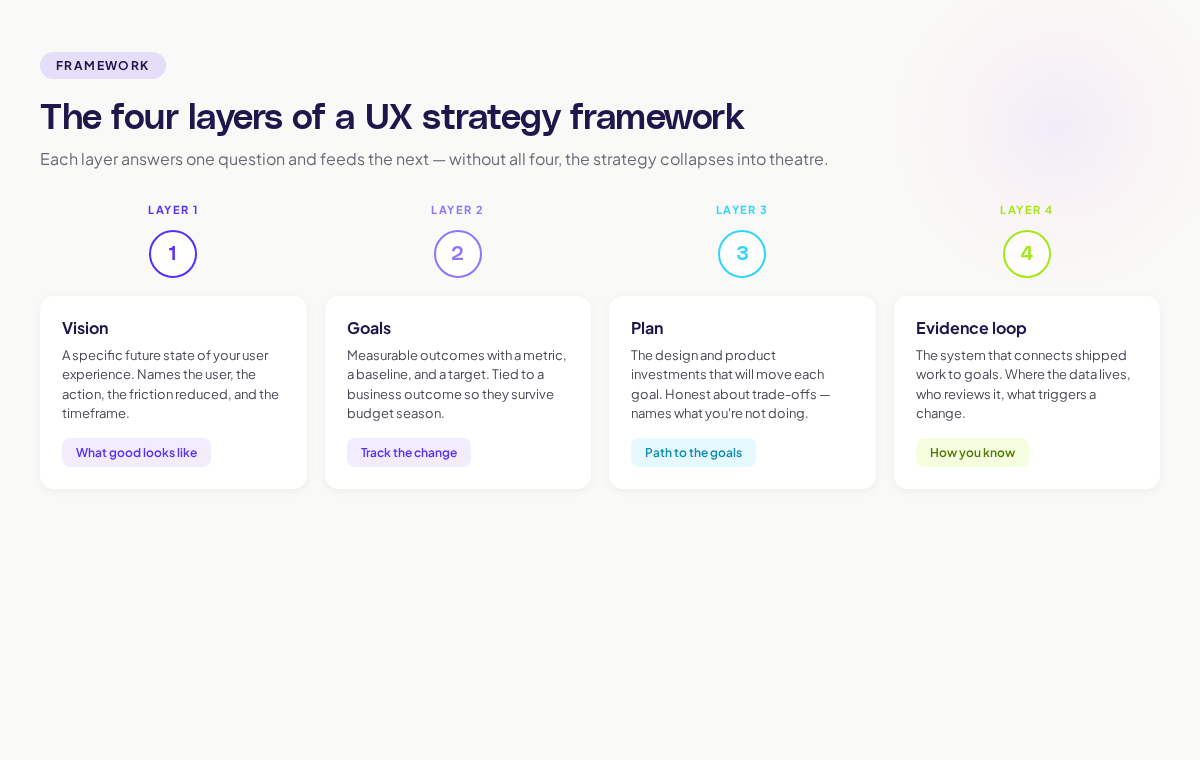
Build your framework in four layers. Each layer answers one question and feeds into the next.
Layer 1: Vision — what good looks like
Your vision is the specific future state of your user experience. Not "we'll be the best in the market." Specific.
A good vision sentence answers: who are we serving, what will their experience feel like, and what will they be able to do that they can't today? "By Q4 next year, every product manager using our tool will be able to map a full user journey in under 10 minutes, without leaving the product." That's testable. It names the user, the timeframe, the action, and the friction reduction.
If you can't write a sentence that specific, the strategy will fall apart at the next layer.
Layer 2: Goals — measurable outcomes
Goals translate the vision into things you can track. The Nielsen Norman Group recommends connecting UX goals directly to business metrics so the strategy survives budget conversations and quarterly planning. They cover this in their UX strategy study guide, which collects their thinking on visioning across multiple articles.
Each goal needs three properties:
- A clear metric (time to complete a task, activation rate, NPS for a specific flow)
- A baseline (what it is today)
- A target (where you want it by when)
If a goal doesn't have these three properties, it's a wish.
Layer 3: Plan — the path to the goals
The plan is where strategy meets the roadmap. For each goal, you list the design and product investments that will move it. This is the layer where most teams over-commit. Pick fewer things. Ship them. Measure them.
A good plan layer is honest about trade-offs. "We're going to invest in onboarding redesign this quarter, which means we're not redesigning the dashboard until Q3." Vague plans hide trade-offs. Real plans surface them.
Layer 4: Evidence loop — how you know it's working
This is the layer most strategies skip, and it's the one that makes the framework data-driven. The evidence loop is the system that connects shipped work back to the goals, so you can tell what's moving and what isn't.
For each goal, the evidence loop answers:
- What data tells us we're on track?
- Where does that data live?
- Who looks at it, and how often?
- What triggers a strategy change?
This is where journey maps, session replay, and product analytics earn their place in a UX strategy. They're not nice-to-haves. They're the eyes of the framework. Without them, you're shipping into a black box.
A practical example: applying the framework to onboarding
Let's walk through a real scenario.
Vision. "Within nine months, new product managers signing up will reach their first 'aha' moment, defined as creating their first user journey and sharing it with a teammate, in under 15 minutes."
Goals.
- Time-to-first-journey: from current 32 minutes to under 15 minutes by Q4
- Activation rate (signed up users who share their first journey): from 18% to 40%
- Drop-off at the journey-creation step: from 41% to under 20%
Plan.
- Q1: Audit current onboarding using session data; rebuild the empty state of the journey canvas
- Q2: Add an in-product walkthrough triggered on first sign-in
- Q3: A/B test two activation prompts at the share step
- Q4: Measure against goals; decide what to invest in next
Evidence loop.
- Time-to-first-journey: tracked in product analytics, reviewed weekly in design ops standup
- Activation rate: dashboard owned by product growth, reviewed monthly
- Drop-off step: visualised in a journey map with overlaid friction signals; checked at the start of every sprint planning
That's a strategy a designer can use to make a decision tomorrow. If someone proposes adding a new step to onboarding, you can ask: does this move time-to-first-journey down or up? If it goes up, the proposal needs evidence that the new step pays off elsewhere.
How visual product intelligence fits the framework
The hardest layer to build is the evidence loop, because data is usually scattered. Behaviour analytics in one tool. Session replay in another. Journey maps drawn manually in Figma. Heatmaps in a third platform.
This is where Adora's approach to visual product intelligence changes the work. Instead of stitching together five tools, you map a journey once and overlay the live behaviour data, friction signals, and session context directly on the product. When you're reviewing the onboarding goal, you're looking at the actual screens with the actual drop-off points highlighted. No exporting, no joining. Read more about how this works in our guide to AI journey mapping.
The framework still applies regardless of the tools you use. The point is that the evidence loop has to live somewhere a designer or PM can act on without spending half a day pulling data.
Common mistakes that break the framework
A few patterns kill UX strategy frameworks faster than anything else.
Treating the strategy as one-and-done. A strategy is a living thing. Review it quarterly. Update goals based on what the evidence loop tells you. If your strategy doc hasn't been touched in six months, it's not a strategy.
Letting goals drift away from business outcomes. If a UX goal has no business metric attached, it won't survive when budgets get cut. Tie every goal to retention, conversion, expansion, or efficiency. McKinsey's research on experience-led growth makes the case for this connection explicitly: companies that link experience improvements to revenue outperform their peers.
Skipping the evidence loop because data is hard. This is the most common failure mode. Teams build the vision, goals, and plan, then say "we'll figure out measurement later." Later never comes. The evidence loop has to be in version 1, even if it's rough.
Confusing principles with strategy. "We believe in user-centred design" is a principle. It's not a strategy. Strategy says where you're going, by when, and how you'll know you got there.
How to roll out the framework with your team
If you're starting from scratch, do it in this order. Don't try to build all four layers in parallel.
- Run a vision workshop. Two hours. Everyone in the room. Write a vision sentence specific enough to test. Don't leave the room until you have one.
- Pick three goals. Not ten. Three. With baselines. With targets. With dates.
- Sketch the 90-day plan. What ships next quarter to move those three goals. Be honest about trade-offs.
- Build the evidence loop last but build it. Pick the metric for each goal. Pick the tool that surfaces it. Pick the person who owns the review. Set the cadence.
Then put the whole thing on one page. One. Page. If it doesn't fit on a page, nobody will read it twice. The Forrester research on customer journey management found that only 20% of journey professionals have integrated tools and processes for cross-channel execution; their findings are in the customer journey management 2026 article. Most teams know this is the gap. They just haven't simplified enough to fix it.
Connecting the framework to design reviews
The final test of a UX strategy framework is whether it shows up in a design review. If a designer can present work and a PM can ask "which goal does this move?" and the designer can point to evidence, the framework is alive. If those questions feel awkward or off-topic, the framework is theatre.
Build the habit. Every design review starts with: which goal, what evidence, what we expect to happen. Every design review ends with: how we'll know it worked, by when. This is where the strategy stops being a doc and starts being a way of working.
Where to go next
A UX strategy framework only works if the rest of your design system feeds into it. Two adjacent reads will help:
- The user journey mapping complete guide covers how to build the journey maps that power the evidence loop.
- The product analytics dashboard guide shows how to build the dashboards that feed your goal reviews.
Strategy without evidence is theatre. Evidence without strategy is noise. The framework is what turns both into design decisions you can defend.
Related posts

Why We Built AI Product Insights
The story behind Adora's AI Insights, and why I think this is the future of how product teams operate.

Data-driven off a cliff: why dashboards are dead
Dashboards are dead. Not because data doesn't matter. But because the way we've been accessing it was never actually built for the people making product decisions. Here's what went wrong, and what comes next.

SaaS Pricing Pages to Sign Up Journeys
This teardown analyzes SaaS pricing pages and their connected sign up journeys. Learn how leading SaaS companies design pricing, CTAs, and sign up flows that reduce friction and increase conversion.